



Orders keep getting smaller, with more SKUs and shorter lead times, while every job change on a flexo press still costs printing plates, make-ready time, ink mixing and waste sheets. This is a familiar problem for most corrugated packaging plants today. Industrial inkjet printers (digital printing) solve it differently: they print directly from the file, need no plates, and change jobs almost instantly. This page explains what an inkjet printer is, where it fits in the production line, which types are available, and what to consider before investing.
What is an industrial inkjet printer?
An inkjet printer is a non-contact printing system. The controller processes the artwork file, converts it into pixel data and drives the print heads to fire very small ink droplets onto exact positions on the substrate. The dots combine to form text, images, barcodes or QR codes at the required resolution.
Colour inkjet printers usually run the four-colour CMYK set – Cyan, Magenta, Yellow, Black. Some configurations add Light Cyan, Light Magenta or white to widen the colour gamut and render smoother gradients.
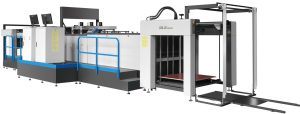
An industrial inkjet printer for corrugated sheets consists of four main units:
- Feeder: separates and feeds sheets one by one, using wheels or belts combined with vacuum. Belt feeding is generally better suited to large or heavy sheets.
- Media transport: rollers, conveyor belts and a vacuum table keep the sheet flat and stable through the print zone – the key factor for print registration accuracy.
- Print engine: the ink supply system (ink tanks, filtration, pressure control, recirculation) and the print heads – the core components that determine print quality and speed.
- Delivery: conveyors and rollers carry printed sheets out and stack them, preventing misalignment and ink smearing.
The role of inkjet printers in a corrugated packaging line
In a corrugated plant, the inkjet printer usually sits after the corrugator: corrugated sheets are printed directly, then move on to die cutting, slotting, folding-gluing or stitching, just like flexo-printed sheets. Inkjet does not fully replace flexo; it takes over the work flexo handles inefficiently:
- Short runs with many SKUs and irregular repeat orders – no plates needed for each design.
- Rush orders: no platemaking, plate mounting, colour matching or ink mixing.
- Seasonal, event and promotional packaging; personalised packaging.
- Sales samples and proofs before running large orders on flexo.
- Variable data printing: different lot numbers, barcodes or QR codes on each box.
| Criteria | Flexo printing | Digital inkjet printing |
|---|---|---|
| Printing plates | Required for each design | Not required |
| Job changeover time | Long (plate mounting, colour matching, ink mixing) | Short (file change) |
| Set-up waste | Yes | Very little |
| Suitable orders | Large, stable volumes | Short to medium runs, many SKUs |
| Multi-colour images, gradients | Limited on corrugated board | Well reproduced |
| Cost per unit | Drops sharply with volume | Largely independent of volume, mainly ink cost |
The volume at which inkjet becomes more economical than flexo depends on ink coverage, number of colours, plate cost and labour cost at each plant, and should be calculated from the actual order mix.
Types of inkjet printers for corrugated packaging
Multi-pass (scanning) inkjet printers
The print heads are mounted on a carriage that scans back and forth across the sheet, and the sheet advances step by step after each pass. With fewer print heads, the investment is lower, making it suitable for plants new to digital printing, short runs and sampling. The trade-off is lower output than single-pass machines.
Single-pass inkjet printers
A fixed print-head array covers the full print width, so the sheet is printed in one pass. Output is high, suiting plants with a large volume of digital orders that want to move part of their work off flexo. Investment cost and requirements for feeding, sheet flatness and the ink system are higher.
Inline coding and marking printers
Small print heads mounted directly on conveyors or packing machines print production dates, lot numbers, barcodes and QR codes on finished boxes. These are supporting devices and do not replace graphic packaging printing.
Key factors when choosing an inkjet printer
- Order mix: average run length, number of SKUs per month and share of rush orders. This is the main basis for choosing between multi-pass and single-pass.
- Sheet size and flute type: maximum and minimum print size, board thickness (single wall, double wall) and sheet warp from the corrugator directly affect feeding and print-head gap.
- Liner and ink: kraft, white top and coated liners absorb ink differently; define the ink type (usually water-based) and whether a pre-coat is needed.
- Print quality requirements: text and logos only, or multi-colour images – this determines the resolution and number of colours required.
- Post-print processes: the option to integrate drying, varnish coating or creasing right after the print engine to shorten the process.
- Running costs: ink consumption, print-head lifetime and replacement cost, and scheduled maintenance – these belong in the cost per box, not just the machine price.
- Technical service: installation support, operator training, spare parts and on-site troubleshooting.
Technology trends in packaging inkjet printing
- High-speed single-pass machines are increasingly taking over short and medium runs from flexo.
- Line integration: inkjet print engines combined with coating, creasing and die cutting to produce finished blanks in one run, reducing sheet handling between machines.
- Water-based inks meet safety requirements for food packaging and environmental standards.
- Variable data printing (QR codes, traceability codes) driven by retail chain and e-commerce requirements.
- Software connectivity: centralised file, colour and job management, reducing operator workload.
Inkjet printing solutions from PTS
PTS supplies inkjet printers for corrugated sheets, from multi-pass to single-pass machines, together with installation, training, maintenance and repair services. Before recommending a configuration, we review your order mix, liner types, sheet sizes and the machine’s position in the plant layout to select the right machine type and avoid over- or under-investing in capacity.
See the machine models in this category below.
Conclusion
Inkjet is not the answer for every order, but it is an effective tool for handling short runs, multi-SKU work and rush orders – the work that drags down flexo productivity in many plants. Choosing the right machine type based on your actual order mix is what determines the return on investment.
Contact PTS Industries Co., Ltd. for advice on the right inkjet printer configuration for your plant.